by David Hakala
The Active Desktop feature, available in Windows since Windows 98, allows the use of many kinds of files as the desktop background. Before Active Desktop, only static bitmap (BMP) images could be used as desktop backgrounds. Now your background can be a live Web page constantly updated with news, weather, and sports; a movie file; or just about anything you can display.
But who stares at their desktop background all day? Most users find a static image is all the diversion they need or have time to glance at in between opening and closing application windows.
Active Desktop consumes significant resources even when no active content is being displayed. Disabling Active Desktop can give your computer a noticeable performance boost.
Unfortunately, since Windows XP came out it has been more difficult to disable Active Desktop. You have to edit the registry.
You can disable Active Desktop for just one user or for all users of a machine. To prepare to disable Active Desktop for just the current user,
Click Start then Run and enter regedit
Navigate to the following “current user” key:
[HKEY_CURRENT_USER\Software\Microsoft\Windows\CurrentVersion\Policies\
Explorer]
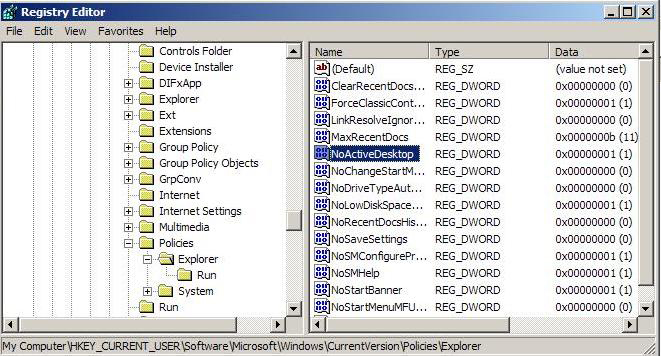
Active Desktop
[HKEY_LOCAL_MACHINE\Software\Microsoft\Windows\CurrentVersion\Policies\
Explorer]
Right-click in the right-hand window and click on “New” for a pulldown list of new items you can create. Select new “DWORD”.
Enter “NoActiveDesktop” as the key name, without quotes.
Double-click on the NoActiveDesktop key to change its value. A value of “1” enforces this restriction. A value of “0” allows Active Desktop.
Even Microsoft has discontinued Active Desktop in Vista. In its place is Vista’s Windows Sidebar, a “widget engine” that appears as a sidebar to the side of the desktop. It enables display of active content such as clocks and CPU usage. Several widgets ship with Vista but anyone can develop a widge that will run in the Windows Sidebar.
If you just can’t stand the same old desktop background all the time, try a wallpaper changer such as Wallpaper Master. You can select a group of images that will be rotated as your background at preset intervals or when certain events occur.
David Hakala has written technology tutorials since 1988, in addition to tech journalism, profitable content, documentation, and marketing collateral.
Believe I previously commented to you on your ‘how to disable active desktop’ article and even though your article isn’t for Vista’s Home premium, I’d once considered some aspects of your article might lead me to a fix for my issue (an irregularly flash-flickering ghost like ‘white’ start button that persistently and yet seemingly randomly appears just above my auto-hidden taskbar’s actual start button). I thought I’d fixed it by fiddling with the taskbar’s properties and allowing my audio utility (Controls IDT Audio Setting) to ‘always show’ it’s ‘notification’ icon in the systems tray. But I’d forgotten that’s what stopped the appearances of the ghost like flickering white start button and as soon as I tried ‘always hide’ it, the darned start button issue returned. Anyway, I’m pretty sure I wrote you months ago asking about your article (in that it’s first registry key you mention, seems like you omitted something, ie; like the instructions for what to do when we drill down to that first mentioned key (assumedly readers either are either supposed to delete your pictured entry or add it, but your article doesn’t say anything about that first entry ke (other than ‘find it’ and then your article goes on about finding the second registry key. As for my current vista sp1’s registry and your first mentioned key, my registry only has three ‘named’ entries there (ie; “(Default)”, “Disable Thumbnails” and “RestrictWelcomeCenter”) and not surprisingly I have no such second key as your article refers to, plus a registry search fails to hit on any registry entries titled “NoActiveDesktop”. Again no surprise there as your article I believe does mention Vista got rid of the active desktop. Anyway, I’ll keep plugging away at my annoying start issue.
Comment by Steve — October 29, 2009 @ 3:43 am