by Tina Gasperson
Social networking is great for keeping in touch with friends and business contacts, and for getting the word out about your latest project – or just your latest vacation. Sometimes it can get difficult to manage all your online social activity, though. For example, once you’ve updated your status in Twitter, you still have to remember to update your status on Facebook because not everyone who follows you on Twitter is also your friend on Facebook. To keep up with all of that, you might find yourself spending more time online than you want to. Alternatively, you can grab a simple application that will automatically update Facebook at the same time you update Twitter, and vice versa.
First, get the Facebook application. To activate it, click on Go To Application, and then click Allow. The app will prompt you to input your Twitter username and password. Do that and click “Login.” The first thing you’ll see is an interface similar to that which you’d see if you were at the Twitter.com home page. There is a place to enter your “tweet,” and a log of all your friends’ tweets below that. If you’re content with updating Twitter automatically from your Facebook account, then this is as far as you need to go. If you’d like to have Twitter automatically update your Facebook status, then look at the upper right hand corner of the page and click on “Allow Twitter to Update Your Facebook Status.” Confirm your choice, and you’re set.
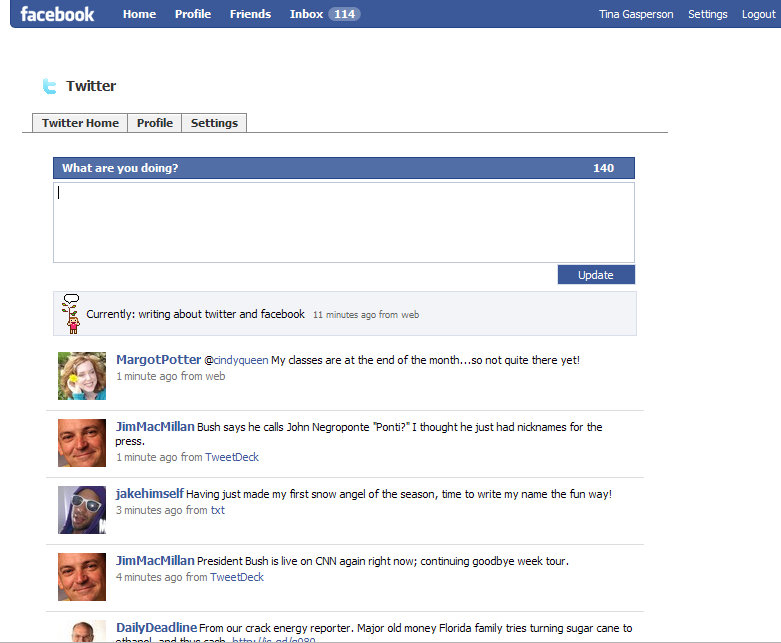
Facebook Twitter App
Tina Gasperson (tinahdee@gmail.com), affectionately known as Computer Lady by her family, has been writing about IT, home computing, and the Internet for more than a decade.
{ 36 comments }
Wonderfully helpful, thanks so much!
Perfect..just what i was looking for..thanks
hello who wants to join???
hi!!!!!
I didn’t realise this could be done. The post is much appreciated. Thank you.
this is just cuuuuuuuuutteeeeeeeeeeee…………
Thanks! I’ve been wondering how to do this for a while
This is very useful to know and saves a lot of double posting.
This really helped. More grease to the elbows of those who developed this application. Please do more for we down here need more of your good works.
APEX. 4rm Nigeria.
I really like reading an article that will make men and women think.
Also, thanks for permitting me to comment!
This can be also one of the causes why most people choose adjustable bench
in the market. If a person is unusually short or tall,
the piece will need adjusting to accommodate the difference from an average player.
t see what you are looking in one place, you may move
and look through other merchants.
Your body should always portray a confident image and your hands
should be flexible and never stiff. This is the sound characteristics of modern transistor circuits,
and retro classic tube equipment but because of its slow rotation rate
(slewrate) and with soft voices. Even though the aesthetic quality of
the sound is state of the art, it is the way the sounds should behave but cannot because they
are fixed recordings that is the fundamental problem of digital pianos.
The existence of a pair of seats definitely makes the assisting uncomfortable.
This allows player of various height, build or age to comfortably sit and be in optimum position at the piano keyboard.
I personally like the cloth seat above a leather
or vinyl seat prime due to the fact of the
capacity of the cloth to breathe.
Players do not get uninterested in the game due to the involvement
of the dealer and play the game in the best suitable way.
These days these poker games are very highly loved
by people. Check out our Flight Control review to find out more.
You will be able so that you can conduct your tradings
quicker so you can get your orders inside help you enhance ones
own profits. In India people are now more aware of the kinds of trading like derivative markets, options, swapping, hedging etc.
Stress represents an essential part in a Forex trader’s
chance for successfulness.
Hello to every single one, it’s in fact a pleasant for me to pay a visit this web
page, it consists of valuable Information.
Hello there! Would you mind if I share your blog with my zynga group?
There’s a lot of folks that I think would really appreciate your content.
Please let me know. Many thanks
Wow that was strange. I just wrote an very long comment but after
I clicked submit my comment didn’t show up. Grrrr…
well I’m not writing all that over again. Anyways, just wanted to say great blog!
I drop a leave a response whenever I like a article on a website or I have something to valuable to contribute to the conversation.
Usually it’s a result of the sincerness communicated in the post I browsed.
And after this post How to Link Twitter and Facebook Accounts.
I was actually moved enough to post a thought :
) I actually do have some questions for you if
you do not mind. Is it simply me or does it
look like a few of these responses come across like coming
from brain dead folks? 😛 And, if you are posting at additional sites, I’d
like to keep up with everything fresh you have to post.
Would you list the complete urls of your community pages like your Facebook page,
twitter feed, or linkedin profile?
I am sure this article has touched all the
internet viewers, its really really nice post on building up
new webpage.
Thanks pertaining to offering many of these wonderful content material.
Hello there! Do you know if they make any plugins to safeguard against hackers?
I’m kinda paranoid about losing everything I’ve worked hard on.
Any tips?
Heya! I just wanted to ask if you ever have any issues with
hackers? My last blog (wordpress) was hacked and I ended up losing months of
hard work due to no data backup. Do you have any methods
to stop hackers?
Good info. Lucky me I recently found your website by chance (stumbleupon).
I have bookmarked it for later!
A portion of your criticisms are accurate. The sort of explanations often required, even in
this field, are a major issue.
Useful info. Fortunate me I found your web site accidentally,
and I am stunned why this coincidence didn’t took place earlier! I bookmarked it.
Undeniably believe that that you stated. Your favourite reason seemed to
be at the net the simplest factor to have in mind of.
I say to you, I certainly get irked while other people
consider concerns that they just don’t know about. You controlled to hit the nail upon the top as neatly as defined out the whole thing with no need side effect , people could take a signal. Will probably be again to get more. Thanks
This article will help the internet viewers for creating new website or even a weblog
from start to end.
Greetings from California! I’m bored at work so I decided to check out your
website on my iphone during lunch break. I really like the knowledge you present here and can’t wait to take a look when I get
home. I’m amazed at how quick your blog loaded on my mobile ..
I’m not even using WIFI, just 3G .. Anyhow, great site!
hello!,I like your writing very a lot! proportion we keep in touch more approximately your article on AOL? I require a specialist on this area to unravel my problem. May be that’s you! Looking forward to look you. kgaeaekakeef
I tend not to drop many comments, but i did some searching and wound up here How to Link Twitter and Facebook Accounts.
And I do have a couple of questions for you if you do not mind.
Could it be simply me or does it look as if like some of the responses appear like they are written by brain
dead folks? 😛 And, if you are posting on other social sites, I would like to keep up with everything fresh you have to post.
Could you list of the complete urls of all your social pages like your linkedin
profile, Facebook page or twitter feed?
It’s an awesome paragraph designed for all the web viewers; they will
obtain advantage from it I am sure.
A fascinating discussion is worth comment. I do believe that you should write more on this topic,
it might not be a taboo matter but generally people do not discuss these subjects.
To the next! Kind regards!!
Hey there would you mind letting me know which hosting company you’re using?
I’ve loaded your blog in 3 different internet browsers and
I must say this blog loads a lot quicker then most.
Can you recommend a good internet hosting provider at a honest price?
Thank you, I appreciate it!
Excellent goods from you, man. I have understand your stuff
previous to and you are just extremely fantastic.
I really like what you have acquired here, really like what
you are stating and the way in which you say it.
You make it entertaining and you still care for to keep it
smart. I can not wait to read much more from you.
This is actually a great website.
I’m amazed, I have to admit. Rarely do I encounter a blog that’s equally educative and entertaining, and let me tell you, you have hit the nail
on the head. The issue is an issue that not enough men and women are speaking
intelligently about. I am very happy that I came
across this in my search for something concerning this.
Comments on this entry are closed.