by Gabe Goldberg
Internet Service Providers (ISPs) like to brag about connection speeds offered and speak glowingly about the wonderful “experience” their services offer. But how honest are their claims and how does connection speed affect what we do online?
The two most important words in any ISPs advertisement or service contract are “up to.” As in, speeds promised are described as “up to X megabits per second.”
(Megabits means “millions of bits” and “megabits per second” is often abbreviated Mbps. A bit is the basic unit of information or data, a “binary digit,” a single unit that is either 0 or 1. Everything on the Internet and all information and software on your computer is composed of bits.)
But quoting “up to” speeds is like saying that an automobile whose speedometer dial includes the number 160 can travel “up to 160 MPH.” When shopping for a car or an ISP, claims shouldn’t be taken as facts — though some are safer to verify than others.
It’s a pleasant surprise when ISPs deliver speeds faster than promised. That results from advancing technology and — in areas fortunate enough to have multiple broadband ISPs — competition. More common, though, is discovering that delivered service doesn’t quite match the 160 MPH sort of promise ISPs make.
So to keep your ISP honest and detect problems, and for bragging rights, it’s useful to occasionally measure connection speeds. Internet connections are usually described with two speeds: download and upload. For nearly everyone, download speed matters most — it’s the rate at which data, Web sites, email, sound files, video streams, telephone calls, and services yet to be invented reach your computer. This greatly affects your Internet experience, determining whether your browser responds quickly or sluggishly to Web requests, how quickly email arrives, etc.
Upload speed measures how fast your computer sends data such as email or Web requests to the Internet. Unless you frequently send large volumes of or huge email or other files — or run a server of some sort – this speed likely isn’t critical.
Speed test
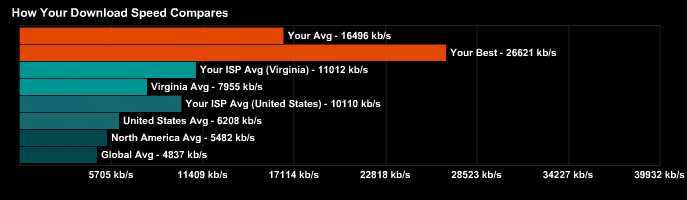
Click the orange pyramid to run download and upload speed tests. When they finish, click My Summary at top to see your download test results along with a number of comparisons — your ISP’s average speed and its speed in your state, your state’s average, and similar numbers for the USA, North America, and globally. Click Upload Results for that set of speeds. SpeedTest.net reports speeds in kb/s — that is, kilobits per second. One Mbps is 1000 kb/s, so an ISP’s promised speed of 5 Mbps would show as 5000 kb/s.
As you run occasional speed tests, your history of speeds achieved lets you can track trends and detect problems. If your speeds don’t match your ISP’s promises — or they decline — it’s worth investigating. Note that cable connection speeds often vary more than those of DSL or FiOS services, though cable broadband is usually faster than DSL. I’m pleased with my Cox cable service, usually delivering more than 20 Mbps download and about 2.5 Mbps upload.
Gabe Goldberg (tiplet@gabegold.com), a lifelong computer pro and technology communicator, has written three books and hundreds of articles for audiences including techies, baby boomers and senior citizens. He enjoys sharing tips and pointers that help people use and have fun with technology.
{ 10 comments }
Not to brag or anything but I think I found a better test…. The above test gives basic speed information but no real info you quality or capability of your connection. My favorite Broadband Speed Test site is http://www.ispgeeks.com.
Click on Broadband Diagnostics then TCP Quality Test or Speed/Cap Test and the rest is simple. They also have a true speed test, voip test and a couple of other things.
You get data back like this (testing my connection)
Speed test statistics
———————
Download speed: 7437424 bps
Upload speed: 1646448 bps
Download quality of service: 97 %
Upload quality of service: 95 %
Download test type: socket
Upload test type: socket
Maximum TCP delay: 76 ms
Average download pause: 3 ms
Minimum round trip time to server: 60 ms
Average round trip time to server: 61 ms
Estimated download bandwidth: 35200000bps
Route concurrency: 4.7328215
Download TCP forced idle: 77 %
Maximum route speed: 8738000bps
Plus it even gives you graphical data such as this (based on the test above).
http://174.34.146.20/myspeed/db/report?id=1986
Probably worth sharing is a tip I discovered (for UK readers at least) that by removing your bell wire see do a google for “Bell Wire Fix” or see you can remove significant interference on the line which can effect your speed by up 20%!
or http://broadband-speedup.blogspot.com/2009/03/how-to-do-it.html
Thanks for the tip Giggles. That is a much better test!
hi i’m wondering if you can answer this trivia question that is bugging me:
if my broadband speed is 500kb/sec what speed in m/s or how long does it take for the connection between me to travel from a server in New York or LA to Sydney.. how fast is the data connections & optic cables in m/s basically ??
cant find any reference online to this .. hope u can help!! 😀
The problem with tests like speedtest.com is that they don’t give real world results. On my rural broadband connection it shows a decent average of 1.30 Mb/s, but when downloading files the actual average is closer to one quarter or less of that. After five years of constant testing using many different sources, I am quit confident in my figures. When speedtest.com reports that it would take 76 minutes to download a move (800MB) then their math is indeed correct according to their own measurement. The trouble is that it would take me closer to 5 hours to get that file. IOW, the on-line speed test results have no practical value.
We’ve fun along with, cause I discovered just what exactly I was interested in. You may have broken our three day very long search! The almighty Bless you person. Possess a wonderful morning. Cya
Good day! Do you know if they make any plugins
to assist with Search Engine Optimization? I’m trying to get my blog
to rank for some targeted keywords but I’m not seeing very
good success. If you know of any please share. Many thanks!
Have you ever thought about publishing an e-book or guest authoring on other sites?
I havve a blopg based upon on the same topics you discuss and
would love to have you share some stories/information. I know myy audience would value your work.
If you are even remotely interested, feel free to send me an e mail.
As an entertainment ‘toy’, however, the magic of the 3D
and Nintendo’s usual fabulous build quality and playful
software mark it out as something special. Depending on what type of
font you’ve opened and what you’re saving to, the author of
Font – Forge offers up a few suggestions for “tweaking” before converting at the following link:
. N5 supports clean ROMs, Homebrews and Multimedia files with no slow-downs
or hang-ups.
Pretty component to content. I simply stumbled upon your blog and in accession capital to say
that I get actually loved account your blog posts.
Any way I’ll be subscribing for your augment or even I
fulfillment you get admission to persistently fast.
Comments on this entry are closed.